
FinOps toolkit
Build FinOps capability on an open foundation
The toolkit
More in the toolkit than most teams use
The Microsoft FinOps toolkit is free and open source, it isn’t tied to a single cloud, and it is Microsoft’s project, not ours. Our people work on it as contributors.
It covers five things: reporting and analytics, AI agents, optimization and alerting, automation, and learning resources. Most teams meet it through FinOps Hubs and use a fraction of the rest. Not because the rest doesn’t apply, but because working out which parts do takes time nobody has spare.
-
Reporting and analytics
FinOps Hubs collect and normalize your cloud cost and usage data. Power BI reports turn it into something a team can read without a query. Open data on pricing and regions fills in what the invoice leaves out, so a number arrives with the context someone will ask for.
-
AI agents
Five agents for Claude Code and GitHub Copilot CLI that already know FinOps hubs, the FOCUS schema, and the KQL underneath. Commands for a month-over-month report or a hub health check, and a read-only MCP connection to the hub you already run. You ask in your terminal instead of writing the query.
-
Optimization and alerting
FinOps Workbooks surface governance and optimization findings in the portal. FinOps Alerts tell you when something moves, while it still matters. The Optimization Engine is a recommendation engine you customize rather than a fixed checklist, so it can carry the rules your own estate runs on.
-
Automation
A PowerShell module and Bicep registry modules put deployment and routine work into the pipelines your team already runs. Nothing here asks for a new place to click, and a hub deployed this way is one you can deploy again without remembering how you did it the first time.
-
Learning resources
The Implementing FinOps guide carries training and implementation guidance, a best-practice library, and the FinOps Framework for Azure. Alongside them, FOCUS makes cost from different providers read the same way, which is what lets one report cover more than one cloud.
-
FinOpsHubs.com
An Allyte product, not part of the toolkit. Once you run a hub, it reads yours and adds richer interactive analysis beside the reports your team already uses. In controlled private preview.
How it fits
Extensions
Extend it with what your business already knows
Cost data on its own can’t tell you who a license belongs to, which team is burning AI credits, or what a workload is for. Those answers already exist, in systems nobody has joined to the cost. An Extension brings one in and complements the toolkit rather than sitting beside it, so the join stops being a spreadsheet somebody rebuilds every month.
Four sources, one place they land, and the same people reading what comes out. Pick an Extension above to follow a single path through it.
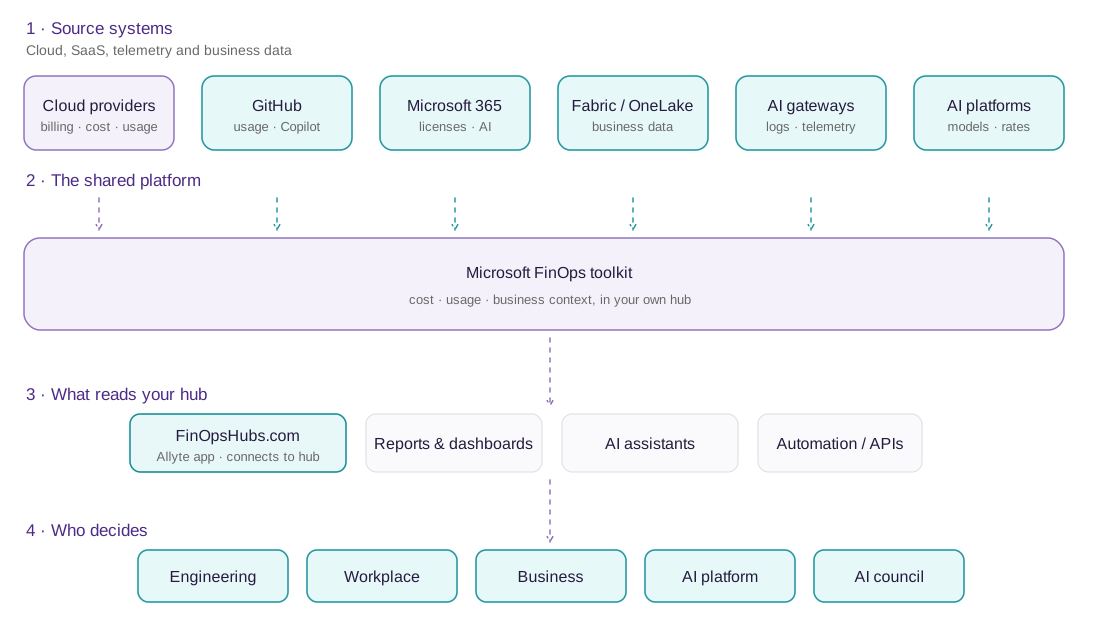
Each extension starts with a known source pattern. We adapt it to your tenant, identity, data model, and operating context. The result stays in your hub for your team to use.
FinOpsHubs.com
Make your FinOps hub easier to use
In controlled private preview
FinOpsHubs.com is our own web app, in controlled private preview. It adds richer interactive analysis next to the reports your team already uses.
Your browser reads your own hub under your tenant and Kusto access controls, on your consent. We hold no standing access to your data.
New to FinOps hubs? Schedule a FinOps toolkit kickstart
Next steps
Three practical paths
Where you go next depends on what you have and how much of it you want to build yourself.
-
Learn and build independently
Deploy the toolkit yourself. The people who work on it meet in public, in rooms Microsoft and the FinOps Foundation own: office hours, GitHub, and Slack.
About the community -
Build together
Schedule a workshop to reach a named outcome. Each one is fixed in scope and led, and your team leaves able to run what it built.
Browse workshops -
Keep an expert close
Get the support you need as the questions arrive. A plan keeps someone who knows this work alongside your team over time, including help with using the toolkit itself.
See plans